Technical Overview
This document will introduce the technical details behind Motocross Madness outdoor terrain files.
To simplify the amount of typing and reading here:
Microsoft's Direct 3D is referred to as "D3D"
3D Studio Max is referred to as "Max".
3D Coordinate Systems - Can Anyone Ever Agree?
It seems every 3D program you use these days uses a different 3D coordinate system to display 3D objects. In the case of Motocross Madness, we require the use of two programs with varying coordinates systems (illustrations are seen from "Front" viewport, not the "Top"):
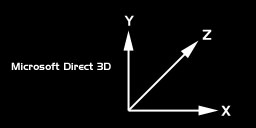
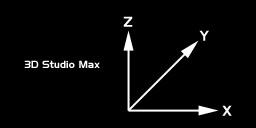
It's confusing, so be careful when collecting data from 3D Studio to use in your scene files. A good method is to write everything down on paper using Studio Max coordinate system, then type the data into your scene files in D3D format. The simple version of the differences between the two is that Y and Z are swapped. A coordinate of 10,20,50 in Max becomes 10,50,20 in D3D's coordinate system.
The scale system used is 1.0 units = 1.0 feet. So 20.5 Max units is the same as 20.5 D3D units, which is 20.5 feet. This part can be kind of confusing too because we model things in Max smaller than they become in the game. The good news is the that scale units are the same.
MCM's 3D World - Welcome to the Center of the Known Universe
At the center both Nationals and Quarry type terrain is a giant chunk of terrain
called a 1x1 (pronounced one-by-one). This chunk of terrain has the following
characteristics:
- 256 x 256 x 2 faces or 131,072 faces
- 257 x 257 points or vertexes across
- when viewed from the top viewport looks like a perfectly uniform
grid
- in Max it is 256 x 256 units (feet) across
- in Max it is centered at 0,0 so it spans from -128 to +128
- no part of the track can dip below an altitude of 0.0 ( all Max Z points must
be
>= 0)
- in the game each 1x1 is scaled up 768x768 feet square by the MakeTerr terrain
compiler
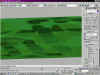
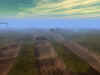
Here are some sample images of the 1x1 terrain commonly known as "Pitfall" in the game:
| top down view of a 1x1 mesh in Max. Notice how from the top it looks perfectly uniform | zoomed in top down view of NW corner of a 1x1 mesh. Even up close it looks both uniform and flat from the top (but its not flat) | Wireframe perspective view in Max of the same mesh | Shaded look at same perspective view. Look familiar now? | Roughly same view as seen in the game |
 |
 |
 |
 |
 |
3D World Layout - Nationals Tracks
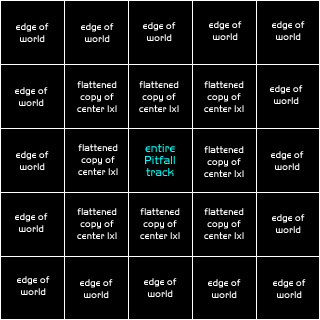
A Nationals track is commonly known, in Rainbow techno speak, as a 5x5 (pronounced five-by-five). This is because of the way the data is laid out in our world. At the center of this giant 5x5 collection of terrain chunks is the original 1x1 track, as in the above example, Pitfall.
Surrounding the center 1x1 are 8 identical copies of the center terrain. These 8 surrounding copies of the track are displaced at a significantly lower elevation strength, so they appear like flattened out versions of the track in the middle. You've probably noticed this if you've explored off the main track after a race.
Here is sample image to illustrate the 5x5 Nationals layout:
By studying the sample layout below, you can see that the Pitfall track is directly in the center a the 5x5 collection of terrain chunks. It it surrounded by 8 copies of itself. Around those 8 copies are the edge of the world geometry. We call Nationals tracks 5x5's because the entire world is composed of 25 giant chunks of terrain arranged in a 5 by 5 grid.
3D World Layout - Stunt Quarries
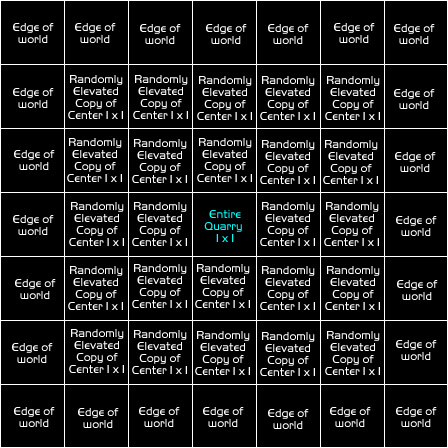
A Stunt Quarry is almost identical to a Nationals track with the exception that there is another row of terrain chunks surrounding the 8 that already surround the center piece. All together there are 49 giant terrain chunks that make up a Stunt Quarry, hence in Rainbow speak, 7x7's (pronounced 7-by-7's).
The 24 terrain chunks that surround the center 1x1 of terrain, are not all flattened out like in the case of the Nationals. These 24 terrain pieces are elevated at varying heights (including negatively displaced which turns them inside out) to create the illusion of a large land area.
Surrounding these 24 chunks of terrain are the edge of the world geometry, just like the Nationals tracks.
Interesting Side Bar: So if each 1x1 terrain chunk is 131,072 faces and there are 49 chunks of 1x1 terrain in a Stunt Quarry, then there a total of 6,422,528 polygons total in a single Stunt Quarry. Its fairly amazing that the game can maintain rendering 30-60 frames per second on a fast Pentium II machine. Obviously, the game doesn't render all 6 million polys on every frame, but the code does have to manage that many polygons in just a few milliseconds. And that my friends, is why lead programmer, math genius, and Rainbow Studios' technology leader Mark De Simone is known simply as, "The Man"! Great job Mark!
3D World Layout - The Infamous Edge of the World
Before reading this section, its important to know that making your own custom edge of the world geometry is COMPLETELY OPTIONAL. If you don't want to learn about this you don't have to. We suggest you choose to use the edge of the world geometry provided in the sample tracks. That way your custom tracks will match the exact style of the edge of the world geometry found in the game.
Making good edge of world geomtry that works well within the game, and actually compiles correctly is pretty tricky. In case you are wondering why we went to all this trouble, its a memory limitation. We had to keep the game running in 16mb of memory, and we didn't want a cheesy fence stopping you at the edge of the world.
In the context of a Nationals track. As long as you stay on the track, the game provides excellent visibility into the distance without any apparent limitations. If you do decide to venture off the track, you have to go quite a ways before reaching a barrier of some sort. Originally, the giant cliffs at the edge of the world were meant to be unclimbable, but that didn't last long. With a little practice you can quite easily make it up the cliffs. Almost everyone who plays the game has experienced what happens if you manage to climb the cliffs and keep on going. KA-BOOM! What we ended up shipping was a really fun way of dealing with the problem of keeping the rider within the boundaries of our 3D world.
The sample image here shows how the edge of the world geometry is broken up:
Each edge of the world chunk of terrain has the following
characteristics:
- 128 x 128 x 2 faces or 32,768 faces
- 129 x 129 points or vertexs across
- when viewed from the top viewport looks like a perfectly uniform
grid
- in Max it is 128 x 128 units (feet) across
- in Max it is centered at 0,0 so it spans from -64 to +64
- no part of the edge of world geometry can go below an altitude of 0.0
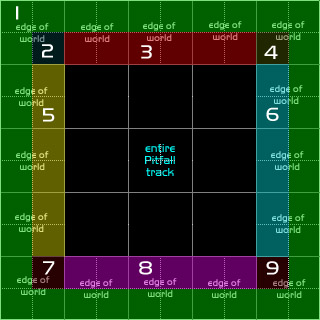
The edge of the world geometry requires 9 separate pieces of geometry to make it work:
1) the outside edge. In the game this is the flat part up high once you've climbed the cliffs. You can drive about half way across the outside edge before the cannon launches you toward the center of the world. This piece is tiled all around the outside edge of the world.
2) Northwest corner piece. This piece must connect seamlessly with the North, West and outside edge pieces
3) North side piece. This piece tiles along the north side of the world and must connect seamlessly with the Northwest, Northeast and outside edge pieces.
4) Northeast corner piece. This piece must connect seamlessly with the North, East and outside edge pieces
5) West side piece. This piece tiles along the west side of the world and must connect seamlessly with the Northwest, Southwest and outside edge pieces.
6) East side piece. This piece tiles along the east side of the world and must connect seamlessly with the Northeast, Southeast and outside edge pieces.
7) Southwest corner piece. This piece must connect seamlessly with the West, South and outside edge pieces
8) South side piece. This piece tiles along the south side of the world and must connect seamlessly with the Southwest, Southeast and outside edge pieces.
9) Southeast corner piece. This piece must connect seamlessly with the East, South and outside edge pieces