
MCM 2 Powercurve Editor Help File |
12/11/2000 ver 1.0 |
Overview
The purpose of this help file is to explain to you how MCM 2 Powercurve Editor works. This utility lets you edit all of the custom powercurves in the selected profile and edit the plate number for the profile. This lets you give yourself a plate number between 1-999. Go to TopUsing the Editor
Quick Tour
Start the editor. The editor by default will attempt to find the default MCM 2 profile and load it. If it can't then you need to use the "File-->Get Profile" menu option to retrieve the profile that you want to edit.
Form Layout
At the top left of the form, the name of the current profile that is being edited is displayed. At the center top of the form the current plate number contained in the profile is displayed. At the top right is the "Save Profile" button. This is used to save any changes that you have made.
Below the name of the profile are two drop down lists. The list on the left lets you select which custom powercurve in the profile to edit. The list on the right contains all the MCM 2 standard profiles that you can use as a starting point for your new profile.
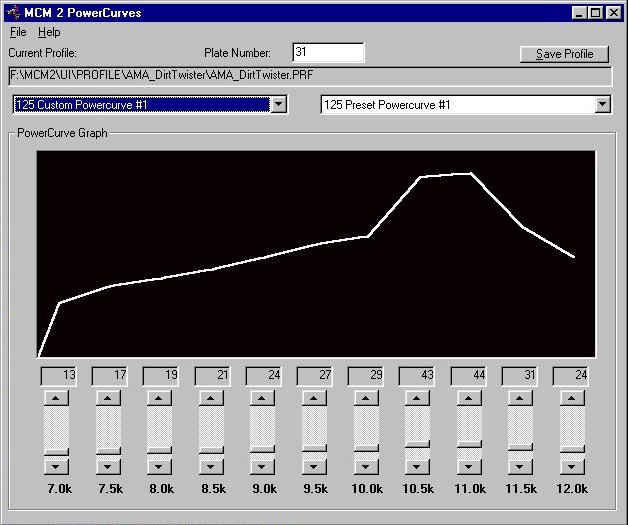
Below the drop down lists is a graphical display of the current powercurve. At the bottom of the form are eleven sliders that let you adjust the horsepower for each RPM range.
Current Profile
Displays the currently selected profile. To retrieve a profile use the File->Get Profile menu option to retrieve a profile.Custom Powercurve
Use the drop down list to select which powercurve to edit.Preset Powercurve
Use this drop down list to select one of the standard MCM 2 powercurves. You can use this to preload a powercurve before you edit it. For example this would allow you to set a 250 to a 400 powercurve or a 400 to a 250 powercurve so that you can race 4-stroke vs 2-stroke on equal terms power wise while still enjoying the sound that you like the best.Plate Number
This displays the plate number contained in the current profile. Change this to any number from 1 to 999.Save Profile
Use this button to save any changes that you have made to the current profile.Menus
- File
- Get Profile - Retrieve an MCM 2 profile
- Exit - Exits Powercurve
- Help - This file
- About
Support
I hope everyone finds this program useful. I would love to hear what your thoughts are. Please send me your suggestions.
Visit my web site for any future updates:
https://bruceatkinson.com/dirttwister
If you have problems with this program, please e-mail me at dirttwister at gmail dot com. Before doing so, please take the time to read the Help file.